Single-Site Church: Add Schedule
Let people know when your weekly services are by adding times to your Church Profile.

Updated
by Jillian Galley
Add Schedule For Church Page
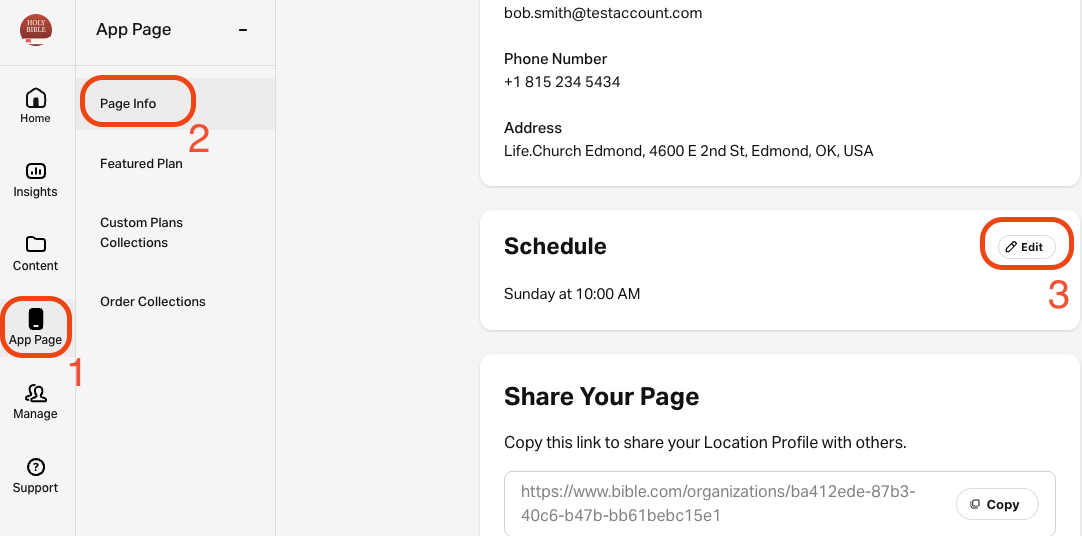
- Go to connect.youversion.com.
- Select App Page on the left navigation menu.
- Select Page Info.
- Select the pencil icon in the top right corner of the Schedule section.
- Choose the day to start the week.Service times will appear based on your selected "Start Week On" day. For example, if you say your week starts on Wednesday, then any services on Wednesday will appear at the top of the list.
- Enter the Schedule start time, day, and a custom description. Add multiple times if needed.
- Click Save at the bottom of the page to apply any changes.
How did we do?
Single-Site Church: Publish Your Church
Single Site Church: Organization Contact Information
