Table of Contents
教會帳戶
你可以把其他人加入你的帳戶,以讓他們能有權限管理你的教會簡介、檢視洞察報告,以及更多。

Updated
by Zizoh Anto
Table of Contents
您可以將其他人新增到您的帳戶中,讓他們能夠管理您的教會檔案、查看分析數據等。
邀請人員
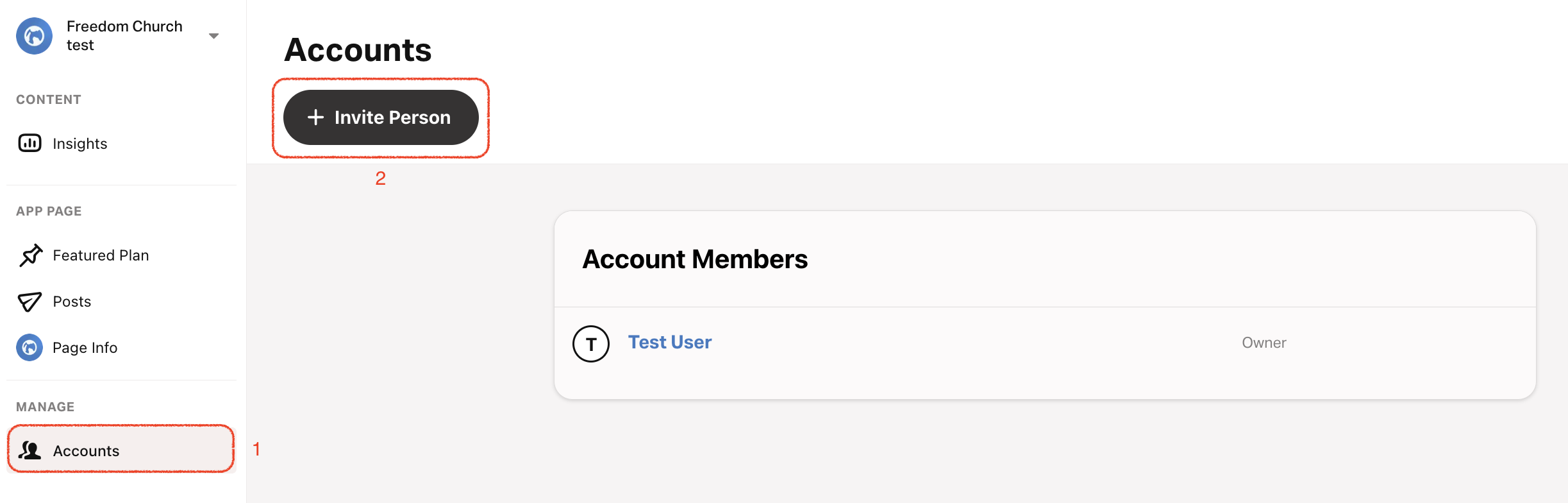
- 選擇 「帳戶」 標籤。
- 左上角: 選擇 邀請人員。
- 輸入他們的電子郵件。
- 指派角色: 有關各個角色樣態的詳細訊息,請參閱 認識角色。
- 如果您的教會有多個地點,您可以將該人員指派到特定地點或所有地點。
當人員受到邀請後,他們'需要先使用其 YouVersion 帳戶登入,才能存取其 YouVersion Connect 帳戶。 如果他們沒有在七天內接受邀請,邀請將會過期,他們'需要重新受到邀請。'
重新傳送邀請
- 選擇 「帳戶」 標籤。
- 選擇您想要重新邀請的人員。
- 移除該人員並再次邀請他們。
移除人員
有時候您可能需要從帳戶中移除某個人員。
- 選擇帳戶分頁。
- 選擇要移除的人員。
- 底部:選擇移除使用者。
- 確認刪除。 這將立即刪除他們的帳戶。
您的教會必須至少有一位具備擁有者角色的使用者。 如果你發現自己不再需要該帳戶,你可以 聯絡我們的支援團隊。
How did we do?
